
Download AnyoneCanAI – Free Collaborative AI Product Creation Platform, Secure Cloud Workspace
Overview: Democratizing AI Product Development
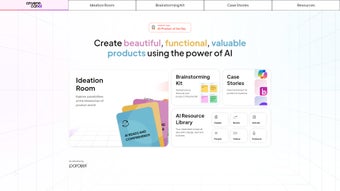
AnyoneCanAI, built by Parallel, is a cloud‑native SaaS platform that transforms the traditionally complex process of building AI‑driven products into a streamlined, collaborative experience. Designed for designers, product managers, developers, and even business leaders with limited technical background, the platform offers a single workspace where ideas are captured, refined, and turned into working prototypes without the need for heavy installations or deep‑learning expertise. From the moment you sign up, you are welcomed by an intuitive dashboard that centralises every stage of the AI product lifecycle – ideation, research, sprint planning, prototyping, testing, and final hand‑off.
The platform’s core promise, “AI for everyone,” is realised through a free‑to‑start tier that provides unlimited access to the Ideation Room, Brainstorming Kit, AI Resource Library, and a curated collection of case studies. By integrating live expert matchmaking, end‑to‑end encryption, and GDPR‑compliant data handling, AnyoneCanAI removes the typical friction points of traditional AI development, such as costly infrastructure, siloed knowledge, and security concerns. Whether you are a solo entrepreneur looking to validate a concept in days or an enterprise seeking to democratise AI across multiple departments, AnyoneCanAI delivers a secure, cost‑effective launchpad that accelerates innovation while keeping the learning curve shallow and the collaboration seamless.
Key Features That Accelerate AI Innovation
- Ideation Room: Real‑time collaborative canvas with AI‑driven suggestions, voting, and comment threads.
- Brainstorming Kit: Ready‑made prompts, persona generators, and frameworks that jump‑start creative thinking.
- AI Resource Library: Hundreds of articles, videos, and downloadable templates covering model selection, data prep, and business use‑cases.
- AI Design Sprint: Structured five‑day sprint workflow that blends design thinking with AI prototyping.
- Expert Connect: In‑platform matchmaking with vetted AI consultants for on‑demand advice.
- Template Gallery: Wireframes, flowcharts, and API integration templates that cut setup time by up to 70 %.
- Secure Cloud Workspace: End‑to‑end encryption, role‑based access, and compliance with GDPR, CCPA, and ISO 27001.
- No‑code Prototyping: Drag‑and‑drop AI components (GPT‑4, Vision API, custom models) onto a visual canvas.
- Export & CI/CD Integration: One‑click export to ZIP or GitHub with built‑in CI/CD connectors.
- Continuous Updates: Monthly feature releases and AI model refreshes keep the platform current.
Each feature is purpose‑built to reduce the time from concept to proof‑of‑concept. The Ideation Room leverages natural‑language processing to surface related ideas from the Resource Library automatically, while the Brainstorming Kit provides a sandbox for prompt engineering without risking production data. The AI Design Sprint adopts Google Ventures’ sprint methodology but adds AI‑specific checkpoints, enabling non‑technical stakeholders to track progress and ROI in real time. Expert Connect ensures that teams can resolve roadblocks quickly, and the secure cloud environment guarantees that sensitive data remains protected throughout the development cycle. Together, these capabilities make AnyoneCanAI a comprehensive, end‑to‑end solution for anyone looking to build AI‑enhanced products efficiently and safely.
Installation & Usage: From Sign‑Up to First Prototype
Step‑by‑Step Sign‑Up Process
- Navigate to anyonecanaI.parallel.com and click “Get Started Free”.
- Enter a work email, create a strong password, and verify the account through the confirmation link.
- Complete the onboarding questionnaire (team size, industry, AI experience) to receive personalised resource recommendations.
- Name your workspace (e.g., “Smart‑Retail Sprint”) and invite teammates via email or SSO.
First‑Run Workflow
After logging in, the Dashboard presents three primary entry points: Ideation Room, Design Sprint, and Resource Library. For newcomers, we recommend starting with the Ideation Room:
- Create a New Idea: Click “Add Idea”, type a concise description such as “AI‑powered inventory forecasting”, and attach any supporting documents.
- Collaborative Enrichment: Team members can comment, up‑vote, or request AI‑generated suggestions that pull directly from the Resource Library.
- Convert to Sprint: When an idea reaches a 70 % consensus threshold, select “Start Design Sprint” to auto‑populate a sprint template.
Running the Five‑Day AI Design Sprint
The sprint follows a proven, time‑boxed structure:
- Day 1 – Understand & Map: Define the problem, target users, and success metrics using pre‑filled worksheets.
- Day 2 – Sketch Solutions: Utilise the Brainstorming Kit to generate low‑fidelity mockups and prompt drafts.
- Day 3 – Decide & Prioritise: Vote on the most viable concepts; the platform automatically creates a prototype backlog.
- Day 4 – Prototype: Drag‑and‑drop AI components (e.g., GPT‑4 text generator, Vision API) onto a no‑code canvas; temporary cloud resources are provisioned for testing.
- Day 5 – Test & Iterate: Invite real users to interact with the prototype, collect feedback, and refine model parameters directly within the interface.
Throughout the sprint, the “Expert Connect” widget remains visible, allowing you to schedule a 15‑minute consultation with a data scientist at any point. Upon sprint completion, you can export the entire project – including code snippets, API keys, and documentation – as a ZIP file or push it directly to GitHub via the integrated CI/CD connector. This end‑to‑end workflow is deliberately designed to be completed within a single week, dramatically shortening the traditional AI development lifecycle.
Compatibility, Pros & Cons, and Frequently Asked Questions
Supported Operating Systems
AnyoneCanAI is a web‑based SaaS solution that runs in any modern browser. It is fully compatible with:
- Windows 10/11 (Edge, Chrome, Firefox)
- macOS Ventura/Monterey (Safari, Chrome, Firefox)
- Linux distributions with up‑to‑date browsers (Chrome, Firefox)
- Android 9+ (Chrome Mobile)
- iOS 14+ (Safari, Chrome)
Pros
- Zero‑install, cloud‑first: Begin instantly from any browser without complex setup.
- All‑in‑one resource hub: Consolidated learning material eliminates the need to search external sites.
- Structured sprint framework: Time‑boxed sprints keep projects focused and deliver tangible prototypes quickly.
- Expert matchmaking: Direct access to vetted AI consultants accelerates problem‑solving.
- Secure & compliant: End‑to‑end encryption and GDPR compliance protect sensitive data.
- Scalable pricing: Free tier for individuals, flexible paid plans for teams and enterprises.
Cons
- Internet dependency: Requires a stable connection; offline work is limited to local drafts.
- Learning curve for non‑technical users: Some AI concepts (e.g., prompt engineering) may still need initial guidance.
- Limited custom model hosting: Advanced users must export models for full control outside the platform.
Frequently Asked Questions
-
Is AnyoneCanAI truly free to use?
Yes. The free tier includes unlimited access to the Ideation Room, Brainstorming Kit, AI Resource Library, and basic sprint functionality. Paid plans unlock larger cloud compute quotas, premium expert sessions, and advanced security controls.
-
Can I integrate my own machine‑learning models?
While the platform ships with pre‑configured AI components, you can upload custom model artifacts (ONNX, TensorFlow, PyTorch) during the Prototype phase. The model is hosted temporarily for testing, after which you can export the code to your own infrastructure.
-
How secure is the data I upload?
All data is encrypted at rest with AES‑256 and in transit using TLS 1.3. Role‑based access control lets you define who can view or edit each project, and the platform complies with GDPR, CCPA, and ISO 27001 standards.
-
Do I need programming knowledge to start a sprint?
No. The sprint workflow is built around no‑code drag‑and‑drop components and guided templates, allowing you to create functional AI prototypes without writing code. Optional code blocks are available for developers who want deeper customization.
-
Which browsers are officially supported?
AnyoneCanAI supports the latest versions of Chrome, Firefox, Edge, and Safari on both desktop and mobile platforms. For optimal performance, enable JavaScript and use a screen resolution of at least 1280 × 720.
Conclusion – Accelerate Your AI Product Journey Today
AnyoneCanAI by Parallel redefines how teams approach AI product development. By unifying ideation, resource discovery, sprint methodology, prototyping, and expert mentorship into a single, secure cloud platform, it removes traditional barriers of cost, complexity, and isolation. Whether you are a solo founder seeking rapid validation or a large enterprise looking to democratise AI across departments, the platform scales to meet your needs. The free tier provides enough depth to experiment, while paid plans unlock the power required for production‑grade prototypes and enterprise‑level security. The only real limitation is the need for an internet connection—a small price for the collaborative agility and speed the platform delivers.
Ready to turn your AI vision into reality in days instead of months? Get started now and experience a seamless, secure, and truly collaborative environment that empowers every stakeholder to contribute to AI innovation. Your next breakthrough is just a sprint away.



.png)



